Most sales teams I have worked with have a Salesforce report that everybody uses and few fully trust. Some leads have no email. Some have an email that is not an email. Somebody typed “N/A” as the company name. The rating says “Lukewarm”, which is not one of the options. Everybody knows the data is not perfect.
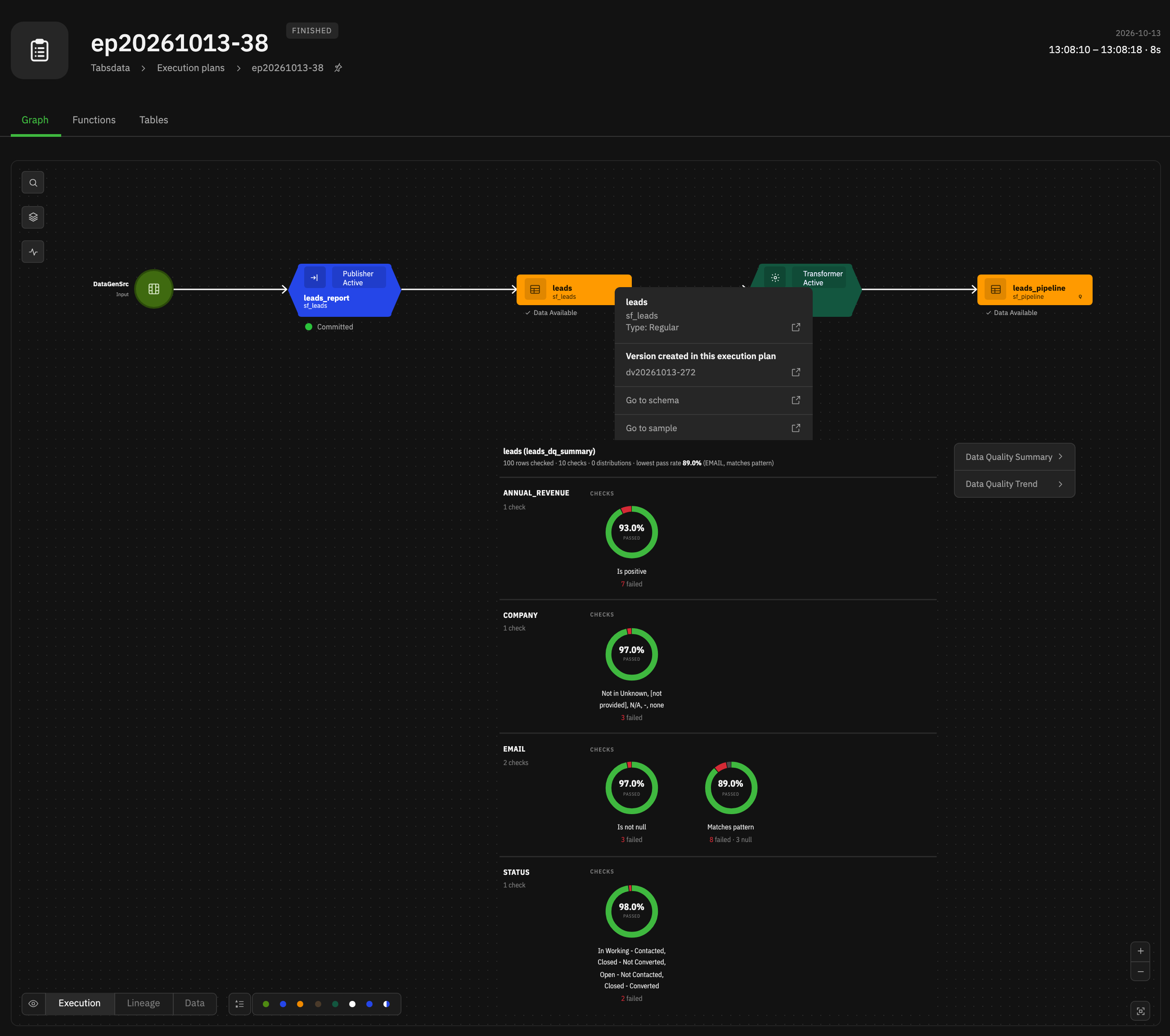
leads table, for one execution: 100 rows checked, 10 checks, grouped by column. Each check shows its pass rate and how many rows failed or were null, and the lowest pass rate is called out at the top.Whether it is getting better or worse is another story. If you want to know, you have to do the legwork. It does not come for free.
In Tabsdata, data quality classifiers can be used to clean your data: filter out the bad rows, quarantine them in another table, fail the run when too many are bad. That is one part of it. The other part is knowing. Is the data good or bad? Is it getting better or worse? Did last month’s fix to the web-to-lead form actually reduce missing emails? Is that new lead source sending junk?
This matters to the business users who consume the data. They need to know how far they can trust the report before they act on it. And it matters just as much to the data engineers who produce it. They need to know when something upstream broke, and whether their fix worked. No data engineering team wants to hear from the business that something in the report does not smell right. By then it is too late. They should be on top of it, and know before anybody asks.
With data quality trends, Tabsdata provides built-in data quality metrics that quickly surface that information, and how it is changing.
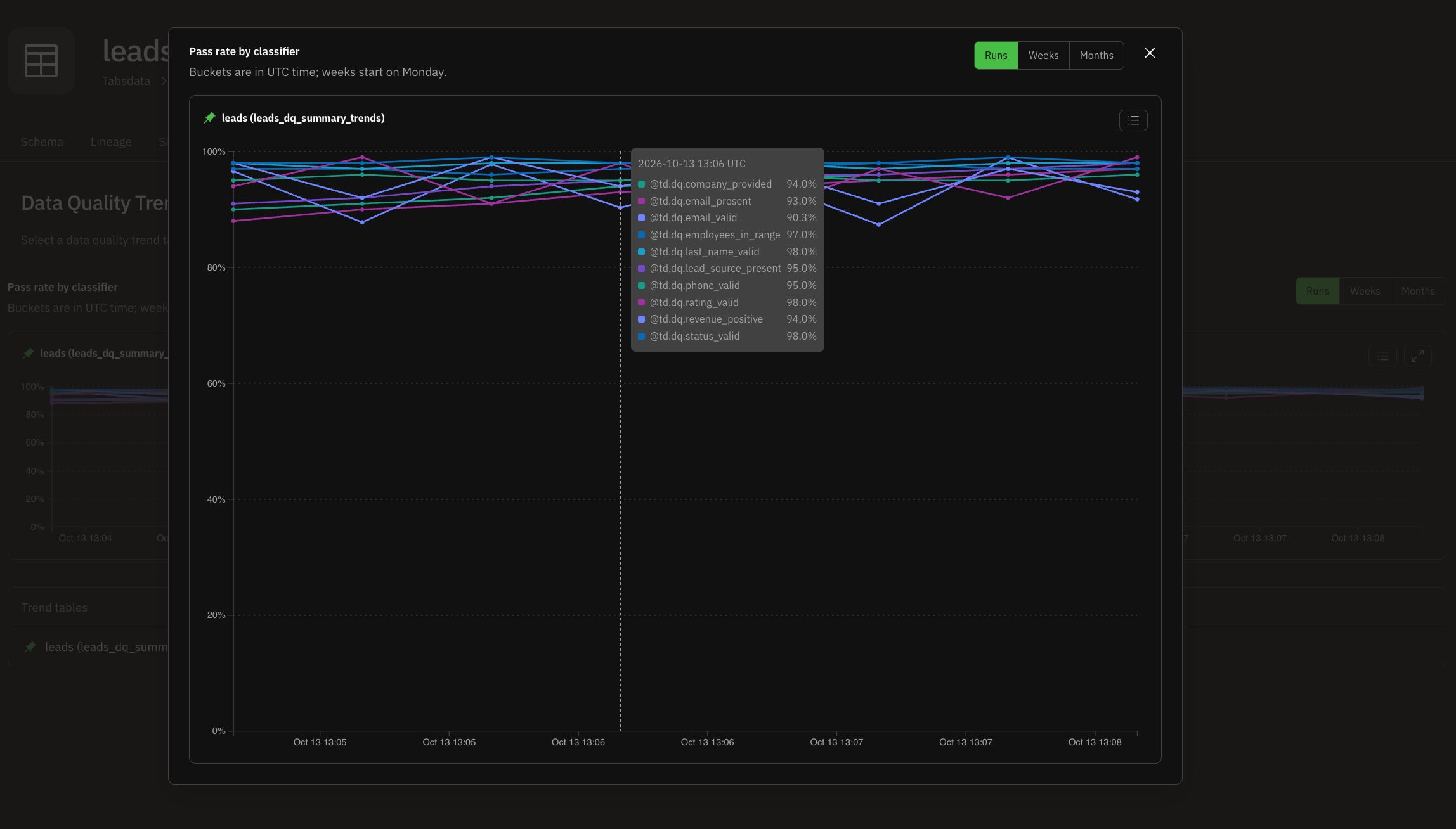
leads table: the pass rate of every classifier, execution by execution. Hover over an execution to see all of them at that point. Runs, Weeks and Months switch between the executions and their rollups.Elsewhere, the usual answer is another tool. A job that scans the tables after they land, a second copy of the data, a scheduler, a database for the results, a dashboard somebody has to build. And then somebody has to keep the checks in sync with the pipeline.
In Tabsdata it is a few lines in the publisher or the transformer producing the data.
The publisher
We want the Salesforce Lead Lifetime Report as a Tabsdata table.
@publisher(
    source=SalesforceReportSrc(reports=["Lead Lifetime Report"], find_report_by="name"),
    output_tables=["leads"],
)
def leads_report(leads: TableFrameSpec) -> TableFrameSpec:
    return leads
That is the whole thing. The Salesforce credentials live in the collection’s connection, not in the function. Every time the publisher runs, it fetches the report and commits a new version of the leads table.
Adding data quality
Now the questions sales ops keeps asking. Is there an email? Is it a valid one? Do we know where the lead came from? Is the company a real name or a placeholder? Are the rating and the status values from their picklists? Does the employee count make sense?
VALID_STATUS = {"Open - Not Contacted", "Working - Contacted", "Closed - Converted", "Closed - Not Converted"}
MISSING_COMPANY_NAME = {"[not provided]", "N/A", "Unknown", "-", "none"}


@publisher(
    source=SalesforceReportSrc(reports=["Lead Lifetime Report"], find_report_by="name"),
    output_tables=["leads"],
    on_tables=[
        DataQuality(
            table="leads",
            classifiers=[
                IsNotNull([("EMAIL", "email_present")]),
                Matches([("EMAIL", "email_valid")], pattern=EMAIL_REGEX),
                IsNotNull([("LEAD_SOURCE", "lead_source_present")]),
                IsNotIn([("COMPANY", "company_provided")], values=MISSING_COMPANY_NAME),
                IsIn([("RATING", "rating_valid")], values={"Hot", "Warm", "Cold"}),
                IsIn([("STATUS", "status_valid")], values=VALID_STATUS),
                IsBetween([("EMPLOYEES", "employees_in_range")], min_val=1, max_val=10_000),
                Matches([("PHONE", "phone_valid")], pattern=PHONE_REGEX),
                HasLength([("LAST_NAME", "last_name_valid")], min_len=2, max_len=80),
                IsPositive([("ANNUAL_REVENUE", "revenue_positive")]),
            ],
            operators=[Summary(trends=Trends())],
        )
    ],
)
def leads_report(leads: TableFrameSpec) -> TableFrameSpec:
    return leads
Ten classifiers, one line each. Each one names its check: email_valid, employees_in_range, revenue_positive. That name is how you will find it later. Summary(trends=Trends()) asks for two things: a summary of every execution, and the trend of those summaries over time.
Notice what is not there. No loop over the rows. No SQL. No second job to run the checks. The function body did not change, it still returns leads. It is all declarative: you say what good data looks like, and Tabsdata takes care of the rest.
No second pass over the data
Calculating data quality does not mean processing the data again. The classifiers run in flight, while the report is being ingested, in the same execution of the publisher. Every row is classified on its way into the leads table.
There is no rescan of the table after it lands, no re-reading of last week’s data, no quality job competing with your pipeline for compute. The rows are already passing through. Tabsdata looks at them once, there.
Data quality is data
The results land in Tabsdata tables, right next to the data they describe:
leads_dq_summary: for every execution, one row per classifier, with how many rows passed, how many failed and how many were null or NaN.leads_dq_summary_trends: every classifier, tracked over time.
They are regular Tabsdata tables. Versioned, like every other table. You can read them in a transformer, join them with other data, alert on them, or send them to Snowflake or Databricks with a subscriber. No export, no API to a separate quality tool, no new place to look for things. If you know how to use a Tabsdata table, you already know how to use your data quality.
Trends
Each classifier is tracked independently, execution by execution, and every execution also counts towards its week and its month. Each level keeps its own span of history: executions for 7 days, weeks for 12 weeks, months for 24 months. Recent history in full detail, older history summarized, so the trend table stays small no matter how long the pipeline runs. Trends(days=..., weeks=..., months=...) changes the spans.
Re-running an execution does not count it twice. Tabsdata keeps track of what is already in the trend.
And because every execution creates a new version of the summary and trend tables, you can go back to any execution and see the summary and the trends as they were then. What did the data look like the day before that form change? Pick that execution and look.
What you see
Nothing to do. It shows up automatically. Tabsdata recognizes data quality tables and gives them their own visualization: when a table has data quality information, a Q shows next to its name and icon, and you get the Data Quality Summaries and Data Quality Trends you saw at the top of this post. No dashboard to build, nothing to configure.
And this is just the beginning. A coming version brings new out-of-the-box metrics and visualizations.
Declare it once
Data quality in Tabsdata is part of the function that moves the data, not a project next to it. You declare the checks once, they run in flight with every execution, the results are tables like any other, the trends are kept and compacted for you, and the UI knows what it is looking at.
The leads report is a simple example. There is more: classifiers for nulls, NaNs, ranges, patterns, lengths and value sets, categorizers that bucket values into histograms, and operators that filter, quarantine or fail on bad rows. The data quality guide has them all.